> ## Documentation Index
> Fetch the complete documentation index at: https://help.moyacascade.com/llms.txt
> Use this file to discover all available pages before exploring further.
# Record fuel and energy purchases
> Record upstream Scope 3 emissions for fuel, electricity, and purchased heating or cooling.
In **Purchases**, choose **#3 Fuel- and energy-related**. Use it to record the Scope 3 emissions associated with producing and supplying the fuel or energy you bought. Moya automatically selects the emission factor for your fuel or energy choice.
## Fuel
1. Click **Add purchase** and choose **Fuel- and energy-related**.
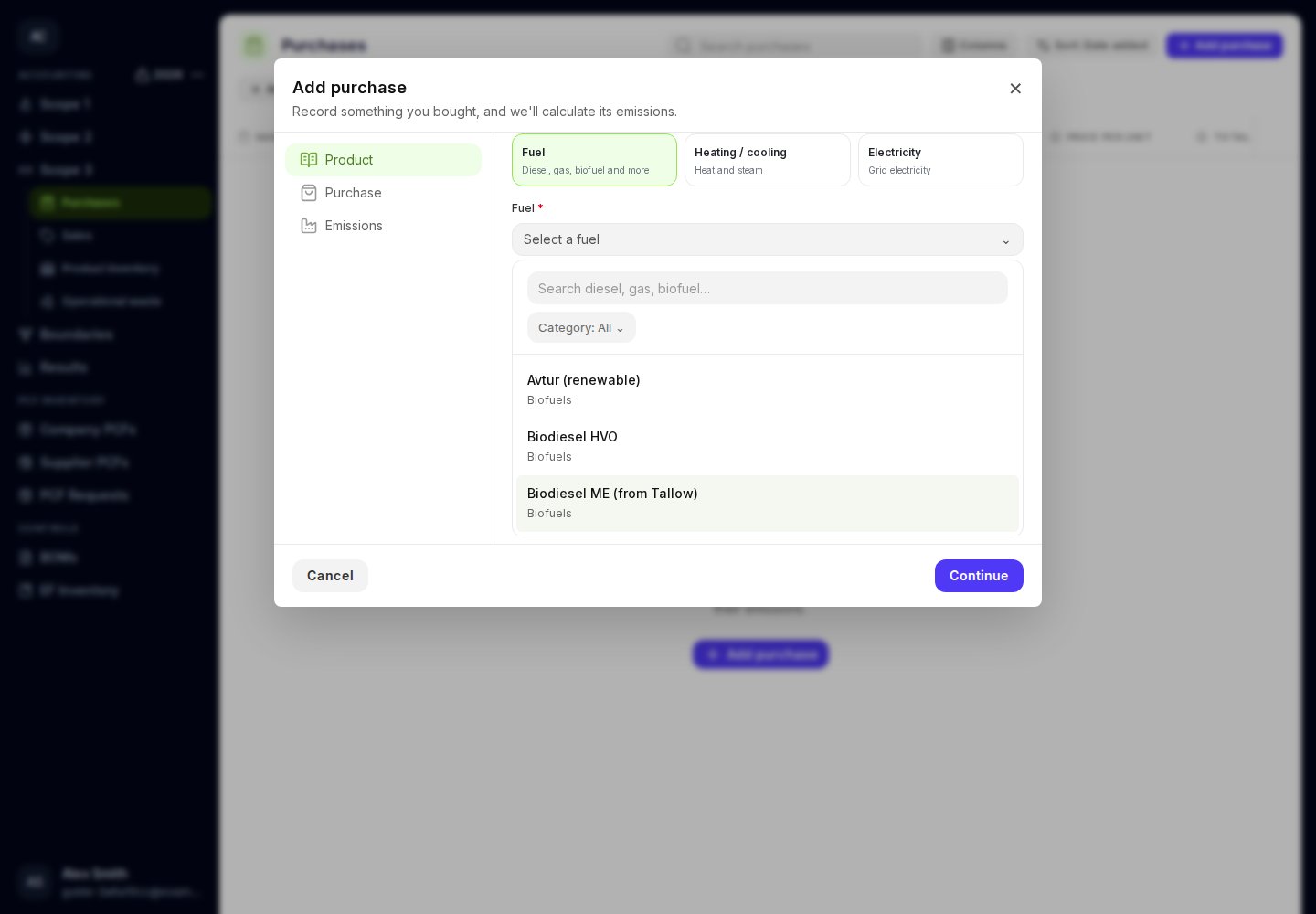
2. Leave **Energy purchase type** set to **Fuel**. Open **Fuel**, search by fuel name, and use **Category** to narrow the choices.
3. Select the fuel. Moya automatically selects the Scope 3 factor for producing and supplying that fuel, using the accounting year.
4. Click **Continue**. Confirm the product and supplier details. Select **Purchase unit**, then enter **Quantity** and **Price per unit**. Common mass, volume, and energy units are available where they match the selected fuel.
5. Enter **Currency**, **Purchase date**, and the invoice total. Review the **FX rate** and calculated USD total. You can override the FX rate.
6. Upload evidence or tick it from **Supporting documents**, continue, review the selected factor, and save.
 Your accounting year determines which fuel factor Moya uses. If a fuel choice includes **Gross CV** or **Net CV**, keep that fuel description and choose a quantity unit such as litres, kg, or kWh.
Fuel purchases contribute to the annual Purchases total in Product inventory. Record fuel burned during the year in Scope 1, and review the year's consumed quantity in Product inventory.
## Purchased heating and cooling
Choose **Heating / cooling** and select **Heating / cooling type** from the available list. Then enter purchase quantities, units, cost, date, and evidence as above. Moya selects the Scope 3 factor automatically. Record the emissions from using purchased heating or cooling separately in [Scope 2](/user-guides/scope-two/heating-and-cooling).
## Electricity
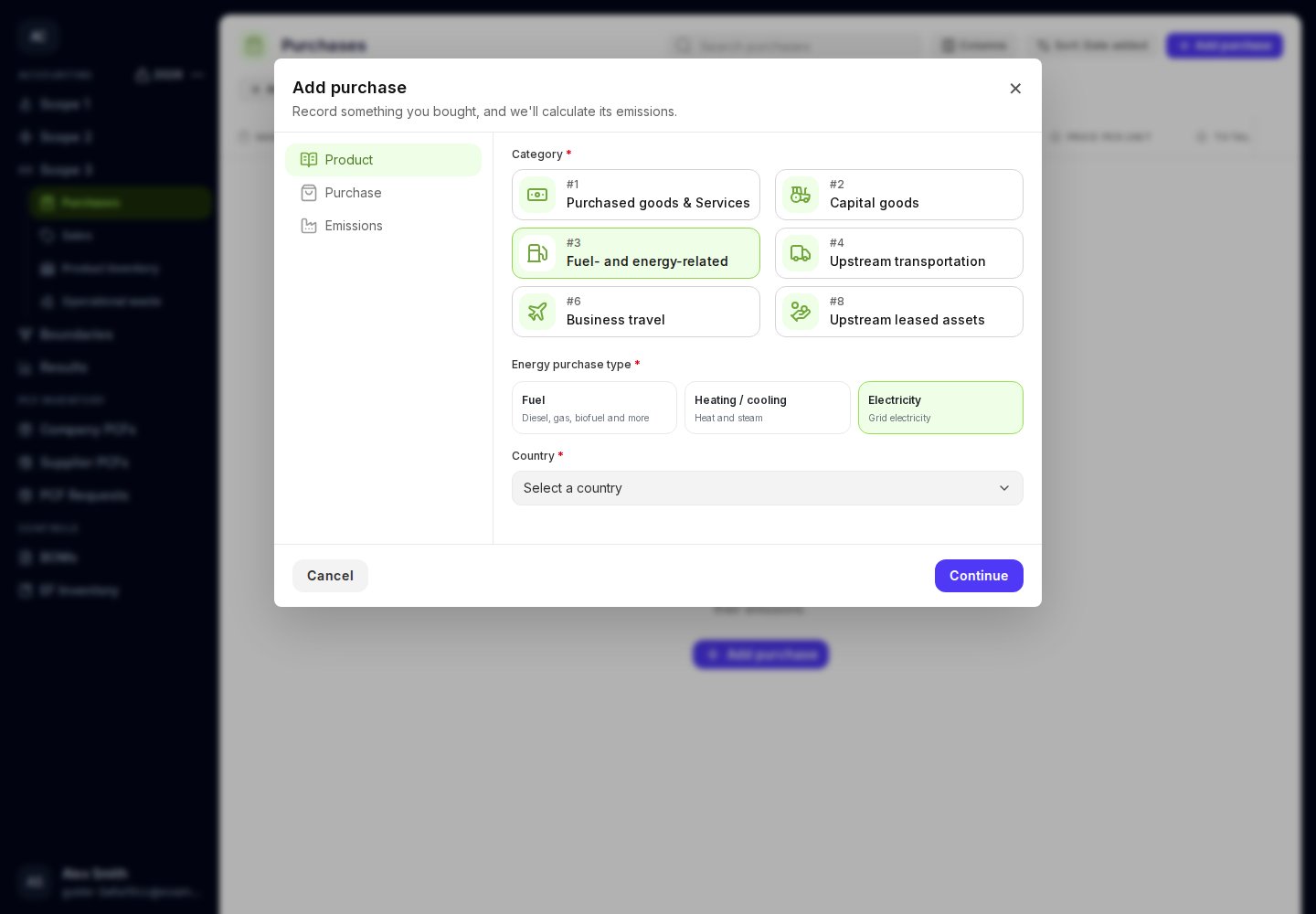
Choose **Electricity**, select **Country**, and continue to the purchase details. Enter the energy quantity and unit, cost, currency, date, and evidence. Moya uses the **accounting year** to select the annual Scope 3 electricity factor.
Your accounting year determines which fuel factor Moya uses. If a fuel choice includes **Gross CV** or **Net CV**, keep that fuel description and choose a quantity unit such as litres, kg, or kWh.
Fuel purchases contribute to the annual Purchases total in Product inventory. Record fuel burned during the year in Scope 1, and review the year's consumed quantity in Product inventory.
## Purchased heating and cooling
Choose **Heating / cooling** and select **Heating / cooling type** from the available list. Then enter purchase quantities, units, cost, date, and evidence as above. Moya selects the Scope 3 factor automatically. Record the emissions from using purchased heating or cooling separately in [Scope 2](/user-guides/scope-two/heating-and-cooling).
## Electricity
Choose **Electricity**, select **Country**, and continue to the purchase details. Enter the energy quantity and unit, cost, currency, date, and evidence. Moya uses the **accounting year** to select the annual Scope 3 electricity factor.
 Electricity and heating/cooling purchases are not included in Product inventory. If the electricity factor is unavailable for your country and year, check your selections and try again.
[Record electricity use in Scope 2](/user-guides/scope-two/electricity) or [record fuel burned in Scope 1](/user-guides/scope-one/combustion).
This documentation is built and hosted on [Mintlify](https://mintlify.com), a developer documentation platform.
Electricity and heating/cooling purchases are not included in Product inventory. If the electricity factor is unavailable for your country and year, check your selections and try again.
[Record electricity use in Scope 2](/user-guides/scope-two/electricity) or [record fuel burned in Scope 1](/user-guides/scope-one/combustion).
This documentation is built and hosted on [Mintlify](https://mintlify.com), a developer documentation platform.