> ## Documentation Index
> Fetch the complete documentation index at: https://help.moyacascade.com/llms.txt
> Use this file to discover all available pages before exploring further.
# Use the Scope 3 workspace
> Navigate the connected purchases, sales, inventory, waste, commuting, and boundaries tables.
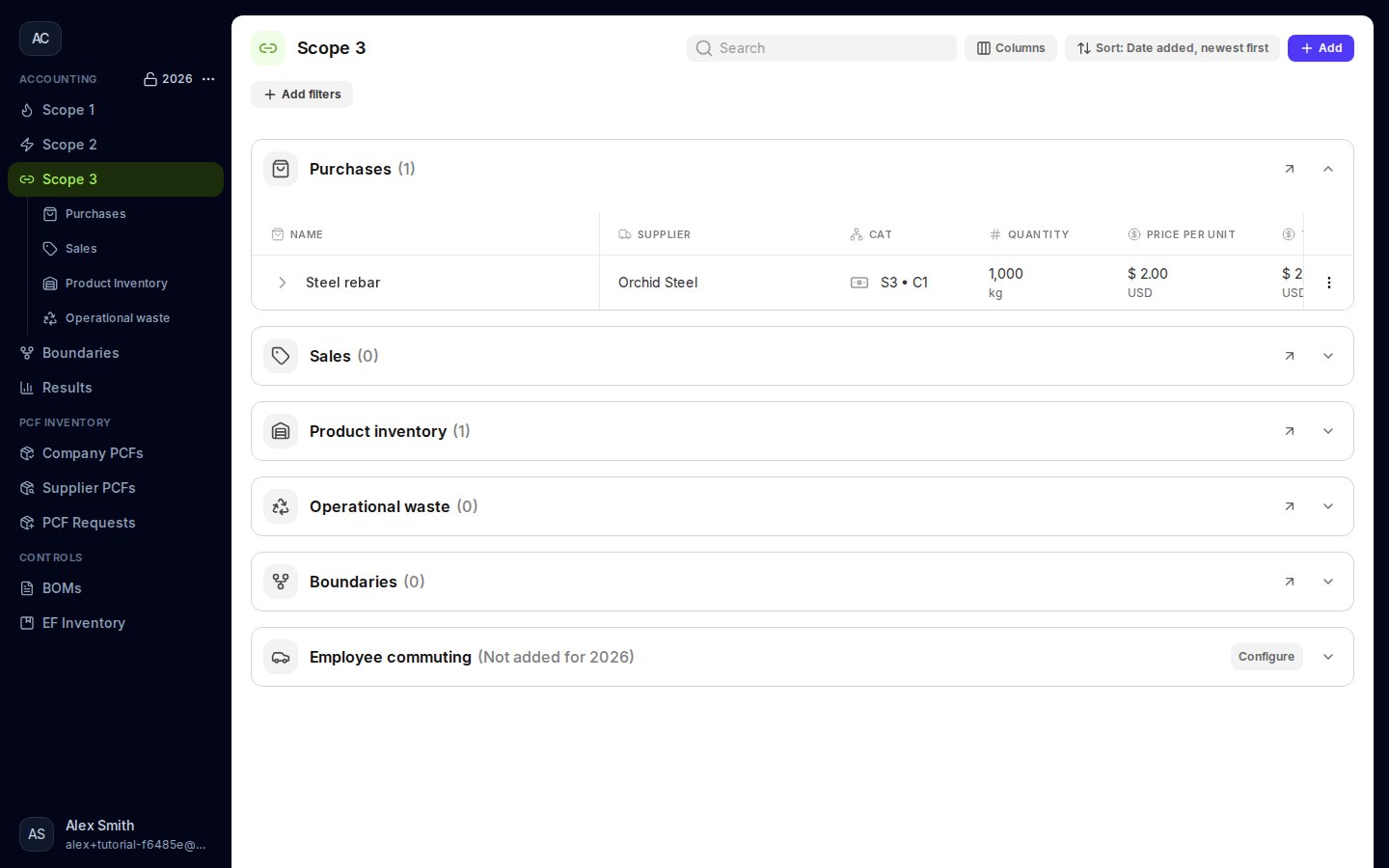
Open **Scope 3** in the sidebar to review the tables for your current accounting year. Each section can be expanded or collapsed. The arrow in a section header opens its full table.
 ## Choose the next step
Goods, capital goods, fuel and energy, freight, business travel, and leases.
Products, services, leased assets, and downstream factors.
Opening stock, purchases, sales, production, and consumption.
Waste type, quantity, disposal factor, and evidence.
Employees, working days, transport mode, and one-way distance.
Entities, their emissions, and ownership and control.
## How the records connect
Product purchases contribute to the accounting year’s **Purchases** total, and product sales contribute to its **Sales** total. **Product inventory** records stock at the start and end of the year, alongside annual production and consumption. Purchases and sales do not update those stock counts. The annual check is **Opening + Production + Purchases = Closing + Consumption + Sales**; emission factors describe the emissions associated with the relevant activities.
Freight, business travel, upstream leased assets, service sales, and downstream leased assets are service activities and are not included in Product inventory. Electricity and purchased heating/cooling are also excluded from Product inventory.
Use **Configure** in **Employee commuting** to add a commuting entry. Use **Boundaries** to define included entities; it is also available directly from the sidebar.
## Review before moving to another year
Check required fields, attached documents, product balances, and the factors used. Use the full tables for search, filters, columns, and row actions. [Reviewing table data](/user-guides/review/table-controls) explains these controls.
Changing the accounting year opens a separate set of records. Earlier-year purchases and sales remain in their own year, while previous closing stock carries into the next year's opening stock.
This documentation is built and hosted on [Mintlify](https://mintlify.com), a developer documentation platform.
## Choose the next step
Goods, capital goods, fuel and energy, freight, business travel, and leases.
Products, services, leased assets, and downstream factors.
Opening stock, purchases, sales, production, and consumption.
Waste type, quantity, disposal factor, and evidence.
Employees, working days, transport mode, and one-way distance.
Entities, their emissions, and ownership and control.
## How the records connect
Product purchases contribute to the accounting year’s **Purchases** total, and product sales contribute to its **Sales** total. **Product inventory** records stock at the start and end of the year, alongside annual production and consumption. Purchases and sales do not update those stock counts. The annual check is **Opening + Production + Purchases = Closing + Consumption + Sales**; emission factors describe the emissions associated with the relevant activities.
Freight, business travel, upstream leased assets, service sales, and downstream leased assets are service activities and are not included in Product inventory. Electricity and purchased heating/cooling are also excluded from Product inventory.
Use **Configure** in **Employee commuting** to add a commuting entry. Use **Boundaries** to define included entities; it is also available directly from the sidebar.
## Review before moving to another year
Check required fields, attached documents, product balances, and the factors used. Use the full tables for search, filters, columns, and row actions. [Reviewing table data](/user-guides/review/table-controls) explains these controls.
Changing the accounting year opens a separate set of records. Earlier-year purchases and sales remain in their own year, while previous closing stock carries into the next year's opening stock.
This documentation is built and hosted on [Mintlify](https://mintlify.com), a developer documentation platform.