
1
Name the BOM
Click Create BOM. Enter BOM name, such as “Steel bracket manufacturing”. The Accounting year is the year already selected in your workspace. Click Continue.
2
Add the outputs for one batch
Enter each output’s Product name, Unit, and Quantity produced by one batch. Select an existing product from the suggestions to copy its details into the BOM. You can adjust the copied details within the BOM.Use Add output for a second product or co-product. For example, one batch produces 5 kg of fabricated brackets and 1 kg of steel offcuts. Each output must have a different name and a positive quantity.
3
Choose how to allocate emissions
For multiple outputs, enter a shared Allocation unit, such as kg. Moya splits the batch’s emissions according to each output’s quantity in that unit.Common compatible units convert automatically. If an output uses a custom unit, enter both conversion amounts, such as 1 box = 3 kg. This describes how that output relates to the allocation unit.
4
Add the inputs for one batch
Click Continue, then choose each input’s scope or category and complete its fields. Enter the quantity needed for one batch, rather than the year’s total.For our example, add 6 kg steel sheet, 5 litres diesel under Scope 3 Category 3, and 200 kWh electricity under Scope 2. Select existing products for the steel and fuel. Add further rows with Add input.Choose the right input and factor for materials, fuel, energy, freight, waste, and leases.
5
Scale the batch to your annual output
Click Go to calculations. Enter Total quantity for any one output. Moya updates every other output and input using the same batch count.Entering 500 kg brackets means 100 batches: offcuts become 100 kg, steel 600 kg, diesel 500 litres, and electricity 20,000 kWh. Changing the offcuts total instead scales the same whole recipe.
6
Review and save
Check both tables: output quantities, allocation quantities, emission factors, and total emissions; input quantities, factors, conversions, and emissions. Use the edit controls to correct a line before saving.Click Create BOM. The BOM appears in the table as V1. Open its name to review the saved calculations.
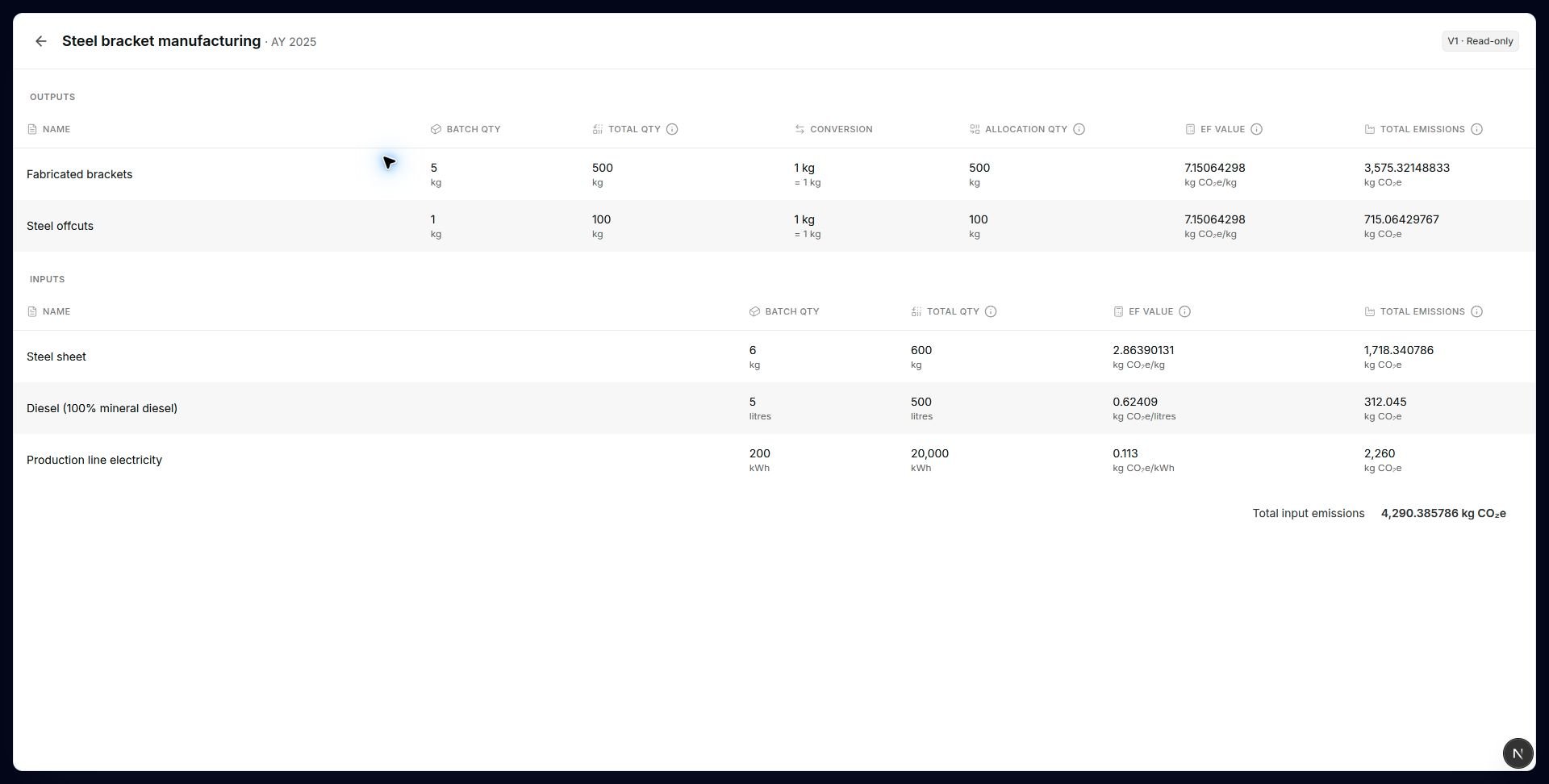
A saved example with two outputs and three inputs.
Example: two outputs
With kg as the allocation unit, brackets receive 5/6 of the emissions and offcuts 1/6. Factors in this example are for demonstration; choose sources that match your own materials and activities.